Mostrando entradas con la etiqueta Team Project Collection. Mostrar todas las entradas

viernes, 5 de abril de 2013

Links útiles #24 Team Foundation Server

1-Alertas en TFS 2012

El artículo nos explica como crear alertas en TFS 2012

http://blogs.msdn.com/b/jasonsingh/archive/2013/03/11/my-email-alerts-in-tfs-2012.aspx

2-Silverlight/RIA Build

http://lemeaow.wordpress.com/2012/10/09/creating-a-silverlightria-tfs-build-using-visual-studio/

3-Custom Activities en TFS

http://devtfs.wordpress.com/2012/10/09/tfs-custom-build-activities/

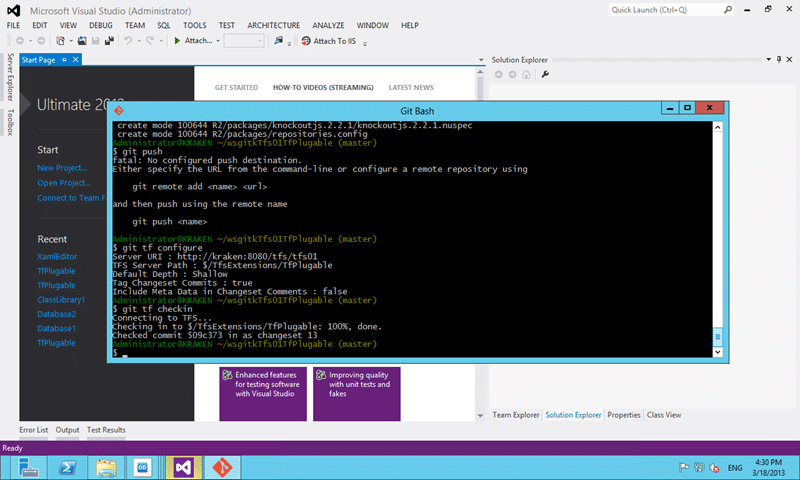
4-Migrar desde GIT a TFS 2012

El siguiente artículo nos explica como migrar un repositorio GIT a TFS 2012 con Git-Tf
image

http://blog.hinshelwood.com/migrating-source-code-with-history-to-tfs-2012-with-git-tf/

5-Sharepoint 2013 Apps y TFS 2012 build

El artículo nos explica como realizar un build con TFS 2012 para una App de Sharepoint 2013

completedbuild

http://www.alexandervanwynsberghe.be/deploying-sharepoint-2013-apps-with-tfs-2012/

6-Renombrar una Team Project Collection

Este artículo nos indica como cambiar el nombre del Team Project Collection, tanto el renombramiento de la base, como detach y attach de las colecciones.

image

http://blog.accentient.com/2013/03/14/RenameATFSProjectCollection.aspx

7-Administración de Proyectos Ágiles con TFS 2012

Visual Studio Team Foundation Server 2012 nos ayuda a planear, administrar, y track el trabajo mediante una tecnología ágil. Se explora product backlog, sprint backlog y task boards, el cual se usa para realizar track del flujo de trabajo durante el curso de una iteracción.

Product Backlog View

http://msdn.microsoft.com/es-es/magazine/dn189203(en-us).aspx

8-Build y Deploy proyectos de Sharepoint 2013 con TFS 2012

clip_image001[4]

Este proyecto contiene scripts de PowerShell y TFS Build workflows que permite realizar un build y deploy de proyectos de Office/Sharepoint 2013

http://officesharepointci.codeplex.com/

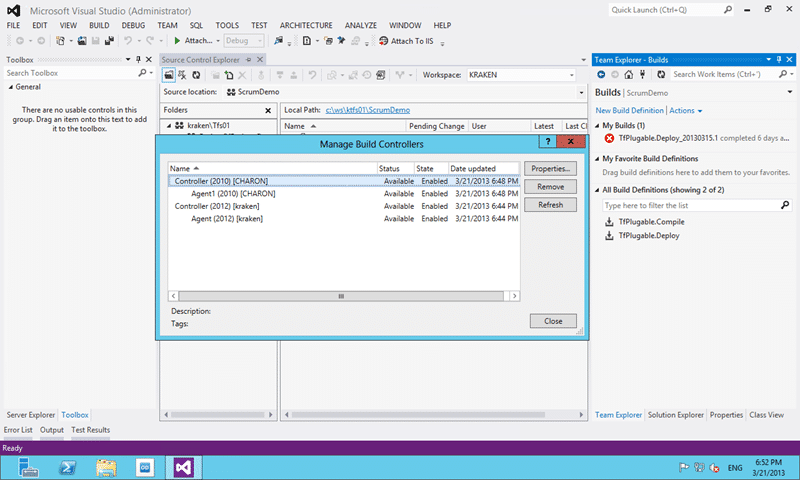
9-Soporte de Visual Studio 2012 Update 2 para TFS 2010 Controlers
image

http://blog.hinshelwood.com/visual-studio-2012-update-2-supports-2010-build-servers/

10-Team Foundation Services Build Apps para Windows Store

The New Section in the Build Report Showing Validation Results

Team Foundation Service permite realizar builds de Apps para la Windows Store

http://msdn.microsoft.com/en-us/magazine/dn166931.aspx

viernes, 6 de abril de 2012

Links útiles #5 Team Foundation 2010

1-Políticas de check-in + tfsccpolicy

http://www.c-sharpcorner.com/UploadFile/40e97e/tfs-2010-%E2%80%93-how-to-set-check-in%C2%A0policy/

2-Hacer un restore de datos a otro server o instancia

http://msdn.microsoft.com/en-us/library/ms252516.aspx

3-Mover o copiar un team project collection

http://msdn.microsoft.com/en-us/library/dd936138.aspx

4-Mover un team project a otro team project collection

http://msdn.microsoft.com/en-us/vstudio/bb840033

http://tfsintegration.codeplex.com/

5-Build en TFS Services

http://geeks.ms/blogs/devnettips/archive/2012/03/29/creaci-243-n-de-una-build-con-el-nuevo-servicio-de-builds-para-tfs-service.aspx

6-Test unitarios con NUNIT en VS11 y tfservices

http://geeks.ms/blogs/devnettips/archive/2012/03/30/tests-unitarios-con-nunit-u-otros-con-vs11-y-en-tfsservice.aspx

7-Burndown

http://blog.hinshelwood.com/whats-in-a-burndown/?utm_source=feedburner&utm_medium=feed&utm_campaign=Feed%3A+MartinHinshelwood+%28Process%2C+Practices+%26+Tools%29

8-Build y deploy de solutiones Azure con TFS 2010

http://blog.slalom.com/2011/08/19/building-and-deploying-windows-azure-projects-using-msbuild-and-tfs-2010/

9-Compatibilidad Visual Studio 2005 y TFS 2010

http://www.microsoft.com/download/en/details.aspx?id=3263

miércoles, 15 de febrero de 2012

Borrar Team Project Collection

  1. On your TFS server, open an Administrative Command Prompt
  2. Change into the TFS Tools Directory. Type:
    cd "%programfiles%\microsoft team foundation server 2010\tools"
  3. Type in the following (replacing [COLLECTION NAME] with the collection you want to delete):
    TFSConfig Collection /delete /collectionName:[COLLECTION NAME]

If you created a SharePoint Portal for your Team Project Collection, you should clean it up as well.

  1. Open the URL of your Team Project Collections SharePoint portal (eg. http://northwind.com.au/tfs/TestProjectCollection)
  2. Select Site Actions | Site Settings on the right
  3. Under the Site Administration subheading, click on Delete this site
  4. Confirm the deletion

If you created a Reports site for your Team Project Collection, you should clean it up as well.

  1. Open the URL of your Reporting Services page (eg. http://tfs.ssw.com.au/Reports/)
  2. Click on the TfsReports folder
  3. Click on the name of the Team Project Collections folder
  4. Click Properties in the top navigation
  5. Click on Delete

Now your TFS server is nice and clean and fit for production.