domingo, 12 de febrero de 2012

Where to store my documents in TFS

Let me start with listing the different possibilities:

  • Store your documents as an attachment of a Work Item
  • Store your documents on the SharePoint portal (or documents folder in Team Explorer)
  • Store your documents in Source Control
Store your documents as an attachment of a Work Item

image

You can store attachments in work item. This is convenient because you have all the extra information (such as screen dumps, xml schemas, diagrams etc.) together with the bug or task.

On the other hand it is more difficult to find attachments.

Conclusion:

Store attachments in a work item if the file is only related to the work item and not to other work items or requirements.

A screen dump of an error is a good example of an attachment, but a diagram for some functional design can better be stored somewhere else.

OData Service for Team Foundation Server 2010

The purpose of this project is to help developers work with data from Team Foundation Server on multiple device types (such as smartphones and tablets) and operating systems. OData provides a great solution for this goal, and has been embraced by numerous developers for building great device-specific applications. OData is accessible from any device and application stack which supports HTTP requests. This OData service interacts directly with the TFS client object model.

What is OData?
OData exposes a way to work with data over the web. If you’re new to OData, I suggest spending a few minutes at http://www.odata.org/ reading about this evolving standard. It uses interfaces similar to REST, so that you can programmatically consume and manipulate data from any device or application stack which supports HTTP requests.

Team Foundation Server was an obvious choice since it not only allows developers to extend TFS in new and interesting ways, but it also allows us to further showcase support for this evolving standard with the developer community at large.


Más información:

http://blogs.msdn.com/b/briankel/archive/2011/10/26/odata-service-for-team-foundation-server-2010-v1.aspx

Cambiar el tamaño de los attachments

image

There where people who changes the attachment size using code:

TeamFoundationServer tfs = TeamFoundationServerFactory.GetServer(@"yourtfsserver/.../DefaultCollection");
ITeamFoundationRegistry rw = tfs.GetService<ITeamFoundationRegistry>();
RegistryEntryCollection rc = rw.ReadEntries(@"/Service/WorkItemTracking/Settings/MaxAttachmentSize");
RegistryEntry re = new RegistryEntry(@"/Service/WorkItemTracking/Settings/MaxAttachmentSize", "20971520");//20MB
       
if (rc.Count != 0)
{   
    re = rc.First();   
    re.Value = "20971520";
}
       
rw.WriteEntries(new List<RegistryEntry>() { re });

But the only thing you had to do in order to change the attachment size in TFS 2010 is to change_tfs_resources to the collection name, as follow:

http://localhost:8080/tfs/_tfs_resources/WorkItemTracking/v1.0/ConfigurationSettingsService.asmx?op=SetMaxAttachmentSize 

TO:

http://localhost:8080/tfs/<CollectionName>/WorkItemTracking/v1.0/ConfigurationSettingsService.asmx?op=SetMaxAttachmentSize

Descargar automáticamente la última versión al editar un archivo

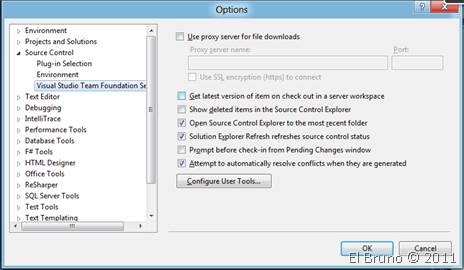
Para el primer caso, debemos acceder a las opciones de Visual Studio 2010, desde el menú “Tools // Options”. Dentro de las mismas acceder a la sección “Source Control // Visual Studio Team Foundation Server” y marcar o desmarcar la opción “Get latest versión of ítem on check out in server workspace”. Esta opción nos asegura que siempre tengamos la última versión de cualquier archivo que estemos editando.

clip_image001

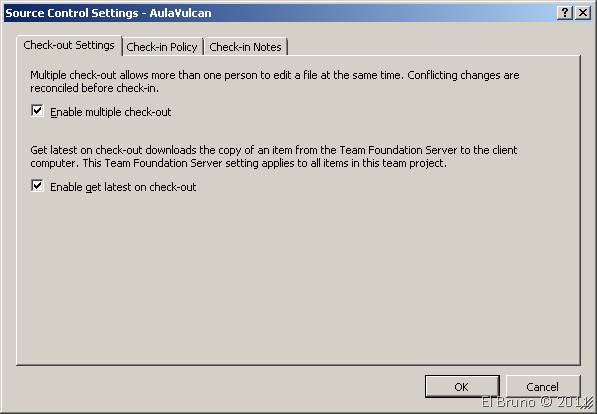
Ahora bien, si lo que queremos es que esta forma de trabajo se aplique para todos los integrantes de un Team Project, podemos aplicar esta configuración a nivel de TP. Para esto, desde en panel Team Explorer, seleccionamos el Team Project correspondiente, luego desplegamos el menú contextual y seleccionamos “Source Ccontrol”. Dentro de la sección “Chec-out settings”, la opción “Enable get latest on check-out” nos permite definir este funcionamiento.

clip_image002

Fuente:

http://geeks.ms/blogs/elbruno/archive/2012/02/12/tfs2010-howto-configurar-la-descarga-automatica-de-la-ultima-version-desde-el-ide-o-desde-tfs.aspx


Compilar VB6 con TFS 2010


Note: There are alternative ways to build VB6 applications not using this activity that are documented in other blog posts

Before you can make use of any of the TFS 2010 community build activities you have to make sure they are available for the build system and on your development PC. Instructions for this process can be found in the ALM Rangers build guide or in the StyleCop page of this wiki. This page assumes the VB6 activity is available in the developers build process workflow toolbox.


Installing VB6

As this activity is a wrapper for the VB6 command line tool, VB6 must be installed on all TFS Build Agent PCs that could run the workflow.

Add the activity to the workflow

The VB6 activity should added to the workflow.  Assuming you are modifying the default build process template, then the key is to replace the MSBuild activity in the ‘Compile the Project’ sequence, as shown below.

image

viernes, 10 de febrero de 2012

Team Foundation Server 2010: Enable checkin policy through code

  1. var projectCollectionUri = new Uri("http://tfs2010:8080/tfs/MyCollection");  
  2. var projectCollection = TfsTeamProjectCollectionFactory.GetTeamProjectCollection(projectCollectionUri, new UICredentialsProvider())  
  3. projectCollection.EnsureAuthenticated();  
  4. var vcs = projectCollection.GetService<VersionControlServer>();   
  5. var teamProject = vcs.GetTeamProject("SomeTeamProject");  
  6. var workItemPolicy=new WorkItemPolicy();  
  7. foreach (PolicyType policyType in Workstation.Current.InstalledPolicyTypes)  
  8. {  
  9. if (policyType.Name == workItemPolicy.Type)  
  10.     {  
  11.         teamProject.SetCheckinPolicies(new PolicyEnvelope[] { new PolicyEnvelope(workItemPolicy, policyType) });  
  12. break;  
  13.     }  


Fuente:

http://bartwullems.blogspot.com/2012/02/team-foundation-server-2010-enable.html#

jueves, 9 de febrero de 2012

TFS Membership Visualizer

TFS Membership Visualizer allow you to generate a dependency graph of TFS security groups and membership